How to play
Field guide to the trail
Dunder Quest is a side-scrolling platformer. You play as a pebble, and you clear a stage by reaching its waygate. There are six stages, and clearing one opens the next on the world map.
Play in your browserControls
| Action | Keyboard | Gamepad | Touch |
|---|---|---|---|
| Move | A / D or ← / → | D-pad or left stick | Arrow buttons, bottom left |
| Jump | Space, W or ↑ (hold to jump higher and float) | A / Cross | Jump button, bottom right |
| Confirm, next card | Space or Enter | A / Cross | Tap anywhere |
| Pause and Spellbook | Esc or P | Start / Options | Pause, top right |
| Back to world map | M | LB / L1 | Pause, then World map |
| Ask the wizard for a hint | H | Y / Triangle | ? button, during a duel |
| Fullscreen | F11 | - | Fullscreen on the title screen (not on iPhone) |
Holding jump floats you for a moment at the top and carries you further. Let go and you drop fast. In the browser, the game can't play sound until you press a key, click or tap once. The title screen takes care of that with your first press. On a phone, the buttons appear once you start a stage; in the Spellbook, tap the sides of the screen to turn pages.
What you'll meet

Emberseed
The collectible. Each stage counts how many you found, and your best count shows on the world map.

Cache stone
Bump it from below and it gives you its seed. It only does this once.

Clay brick
Jump into it from below to break it.

Copperling
Walks back and forth on its ledge. Landing on it beats it. Touching it from the side knocks you out.

Ash shelf
Cracks under your feet, then falls. Keep moving. It comes back when you respawn.

Lantern
A checkpoint. Walk past it to light it, and that's where you come back after a fall.

Waygate
The exit. It's behind the wizard's barrier, so you have to win his duel before you can reach it.

Wizard
Each stage ends in his arena. Walk in and the duel starts. See the section below. Touching him knocks you back.
Glowing ember tiles knock you out if you touch them. A fall sends you back to the last lantern you lit, or to the start of the stage, and the clock keeps running.
Lessons, puzzles and the wizard's duel
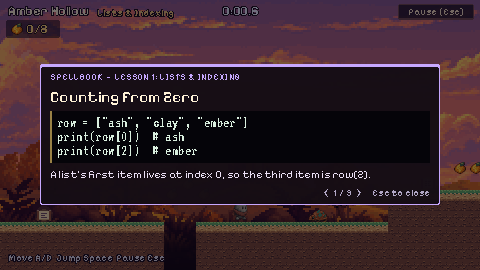
Lore scrolls teach the stage's topic. Touching one pauses the game and opens its card. Press Space or tap to keep going.
The stage puzzle is the way forward. Slates in the scenery show its code, and blocks you bump from below run it. Only the right answer builds the path. The lesson pages explain each one.
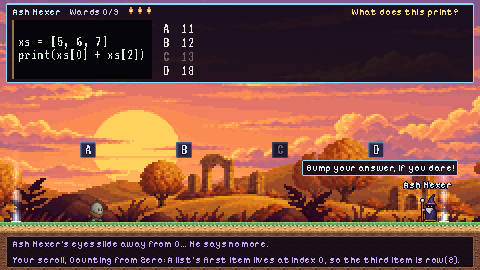
The wizard's duel starts when you walk into his arena at the end of the stage. A seal closes behind you, his question appears across the top of the screen, and four lettered blocks hang over the floor. Jump up into the block with the right answer. Each right answer breaks one ward, the pips above his name. A wrong answer cracks that block, zaps you, and brings a different question. He mostly asks about scrolls you've read, so reading them on the way pays off.
His spells: after giving you a moment to read, he casts. Ward waves roll along the floor, so jump them. From Kiln Mouth on, hexes mark a spot and then strike, so step aside. You have three sparks, shown next to his name. A spell, a zap or bumping into him costs one. Lose all three and you wake at the lantern outside, but the wards you broke stay broken. The clock stops for the whole duel.
Hints: press H (or tap the ? button) once for his riddle and a reminder of the scroll the question comes from. Press it again and he rules out one wrong answer, and its block cracks. There's no third hint.
Spellbook, results and saving
Spellbook: pause with Esc or the Pause button to open it. It keeps every scroll you've read, so you can study before a trial.
Results: when you clear a stage, you see your seeds, time and falls. Your best time and seed count for each stage show on the world map.
Saving happens automatically. In the browser, your progress is stored in that browser on that device, so clearing site data erases it. The desktop builds save to a file in the Godot user folder: %APPDATA%\Godot\app_userdata\Dunder Quest\ on Windows, ~/Library/Application Support/Godot/app_userdata/Dunder Quest/ on macOS, and ~/.local/share/godot/app_userdata/Dunder Quest/ on Linux. To start over, choose New game on the title screen and press it a second time to confirm.